> ## Documentation Index
> Fetch the complete documentation index at: https://flexprice-mintlify-1c79503c.mintlify.site/llms.txt
> Use this file to discover all available pages before exploring further.
# Commitment
> Commitment-based pricing lets a customer guarantee a minimum spend or quantity per billing period while billing actual usage above that floor at a configurable overage rate
Commitment-based pricing is a billing model that lets customers commit to a minimum spend or quantity for each billing period. It gives the business predictable revenue and lets the customer pay for actual usage beyond the commitment at a defined overage rate.
A commitment is configured on a subscription line item and, by default, applies across the entire billing period. To vary the commitment by time of day — for example, higher rates during business hours and lower rates overnight — use [time-of-day buckets](/docs/subscriptions/commitment/time-of-day-buckets).
## How Commitment Works
When a commitment is configured on a subscription line item:
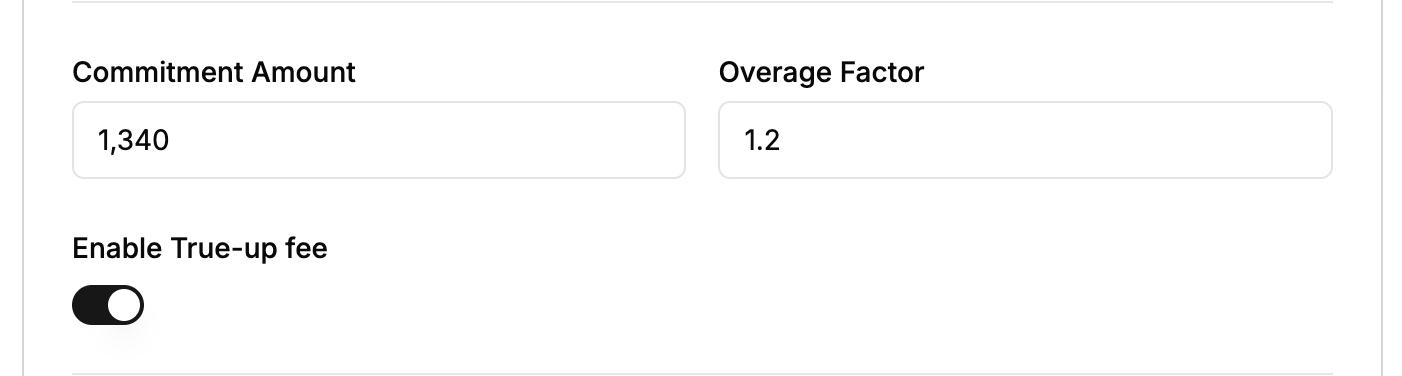
1. **Commitment amount** — The minimum the customer commits to per billing period (e.g. \$1,000/month). This guarantees the revenue floor.
2. **Overage factor** — A multiplier applied to usage cost above the commitment (e.g. 1.5x). When usage exceeds the commitment, the excess is billed at the overage rate.
3. **Usage calculation**:
* If total usage cost ≤ commitment: all usage is charged at the base rate.
* If total usage cost > commitment: the commitment portion is charged at the base rate, and the excess is charged at `base_rate × overage_factor`.
## Steps to Add a Commitment
1. Click **Add Subscription**.
2. Scroll to the **Commitment & Overage** section.
3. Set the commitment amount and overage factor.
 ## Understanding True-Up
True-up ensures the customer pays the full commitment even when actual usage falls short. When true-up is enabled and usage at period end is below the commitment, the shortfall is billed as a separate true-up line item.
### How True-Up Works
1. **During the billing period** — Flexprice tracks usage and computes the running usage cost.
2. **At invoice generation**:
* Usage cost \< commitment AND true-up enabled → a true-up line item is added for the shortfall.
* Usage cost ≥ commitment → standard commitment-and-overage logic applies; no true-up is needed.
### Steps to Add True-Up
1. Click **Add Subscription**.
2. Scroll to the **Commitment & Overage** section.
3. Set the commitment amount and overage factor.
4. Enable true-up using the toggle.
## Understanding True-Up
True-up ensures the customer pays the full commitment even when actual usage falls short. When true-up is enabled and usage at period end is below the commitment, the shortfall is billed as a separate true-up line item.
### How True-Up Works
1. **During the billing period** — Flexprice tracks usage and computes the running usage cost.
2. **At invoice generation**:
* Usage cost \< commitment AND true-up enabled → a true-up line item is added for the shortfall.
* Usage cost ≥ commitment → standard commitment-and-overage logic applies; no true-up is needed.
### Steps to Add True-Up
1. Click **Add Subscription**.
2. Scroll to the **Commitment & Overage** section.
3. Set the commitment amount and overage factor.
4. Enable true-up using the toggle.
 ## Time-of-Day Commitment Buckets
A line-item commitment applies for all 24 hours of the day. If you need different commitments and prices for different parts of the day — for example, reserved capacity 09:00–17:00 UTC and standard pricing outside — configure [time-of-day buckets](/docs/subscriptions/commitment/time-of-day-buckets) on the line item.
## Time-of-Day Commitment Buckets
A line-item commitment applies for all 24 hours of the day. If you need different commitments and prices for different parts of the day — for example, reserved capacity 09:00–17:00 UTC and standard pricing outside — configure [time-of-day buckets](/docs/subscriptions/commitment/time-of-day-buckets) on the line item.